Payroll DashboardsPowered by SelectPayroll
Powered by SelectPayroll

Your payroll already knows the answers.

Years of your payroll data, finally easy to see and understand. Payroll Dashboards turns every processed payroll into a clear picture of what you paid, what changed, and what it really costs.

A quick tour of Payroll Dashboards, under 90 seconds.

$16.00became$1,600.00an hour

The $123,552 decimal point.

A multi-location restaurant group's time import came through at $1,600 an hour instead of $16. Because every import is reviewed before it posts, our team spotted it before payroll ran. On a 78-hour check, that's $123,552 that never left the bank.
What's possible

Questions you never thought to ask your payroll.

Most businesses have never seen what their payroll data can tell them. Here's what Payroll Dashboards answers after every run.

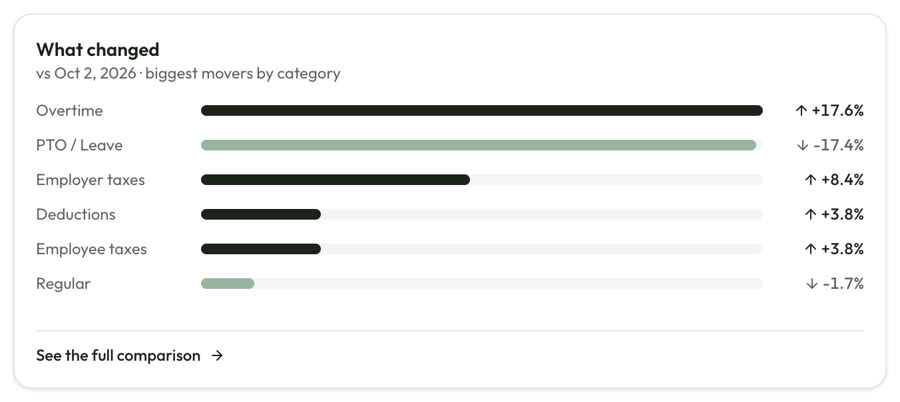
What changed since the last payroll, by category
Why was this payroll higher than the last one?The biggest movers since your last run, by category.
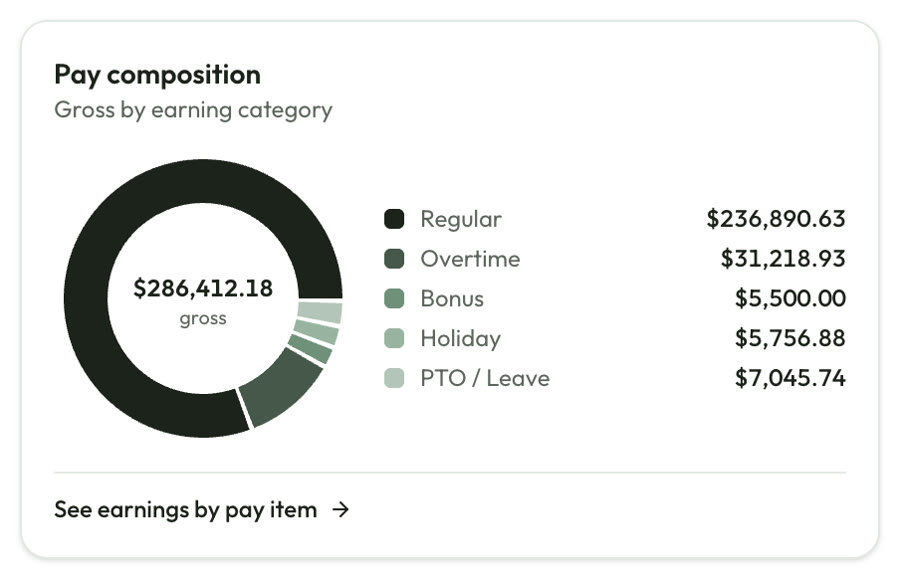
Pay composition by earning category
What is overtime really costing us?Gross pay broken into regular, overtime, bonus, PTO and holiday.
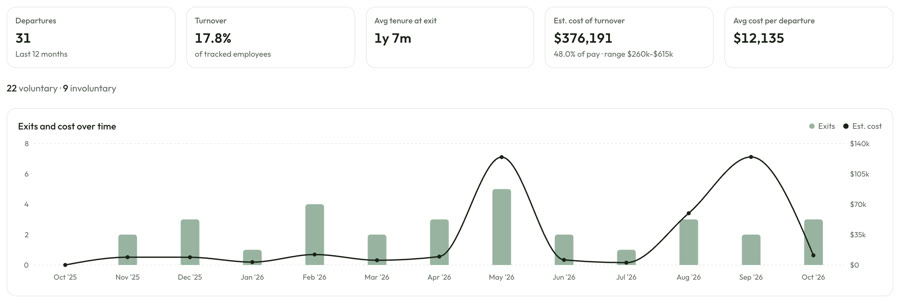
Turnover KPIs and exits and cost over time
What does turnover cost us, in dollars?Departures, tenure at exit and an estimated cost of every exit.
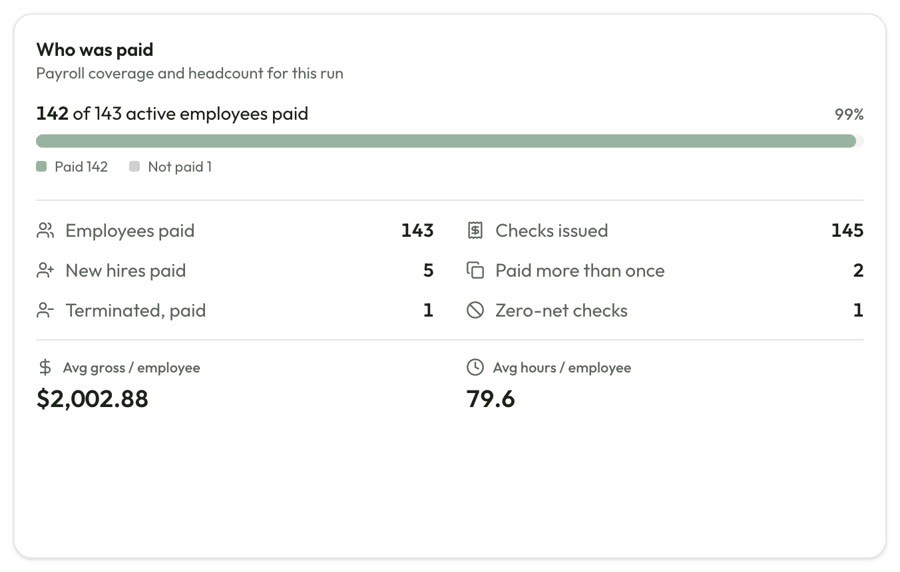
Who was paid panel
Did anyone get paid twice, or after they left?Every run checked against your roster.
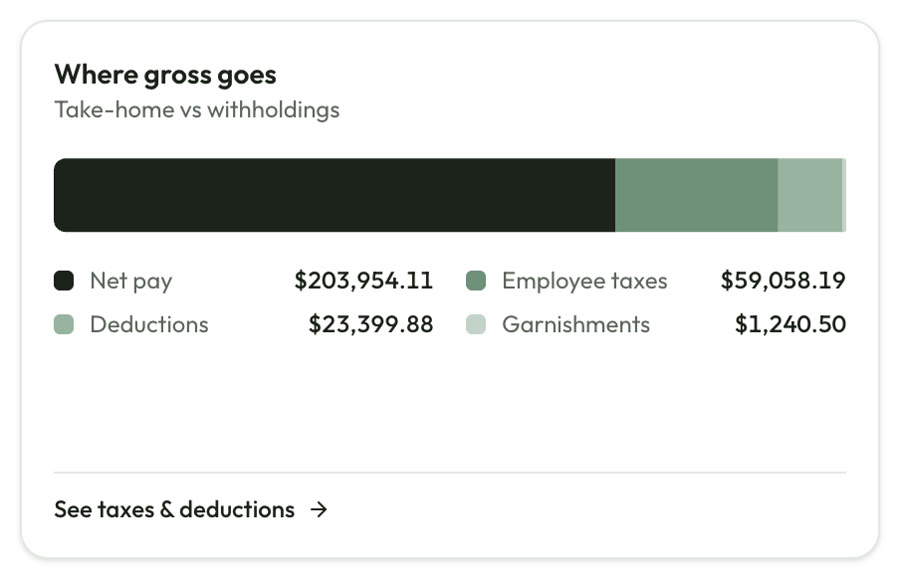
Where gross pay goes: net pay, taxes and deductions
Where does our gross pay actually go?Take-home pay versus taxes, deductions and garnishments.
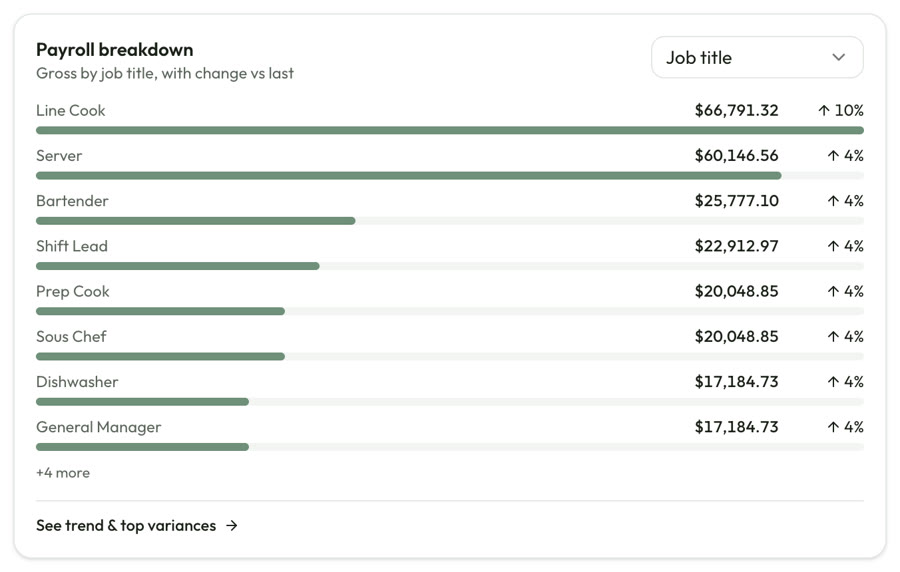
Payroll breakdown by job title with change versus last run
Which jobs and locations drive our payroll?Payroll by job title, location or pay type, with the change since last run.

Screens shown with sample data.

See it

Every payroll, made clear.

The Overview is free for every SelectPayroll client. Workforce Analytics adds the full detail behind each run.

Free

Every payroll, compared to the last one

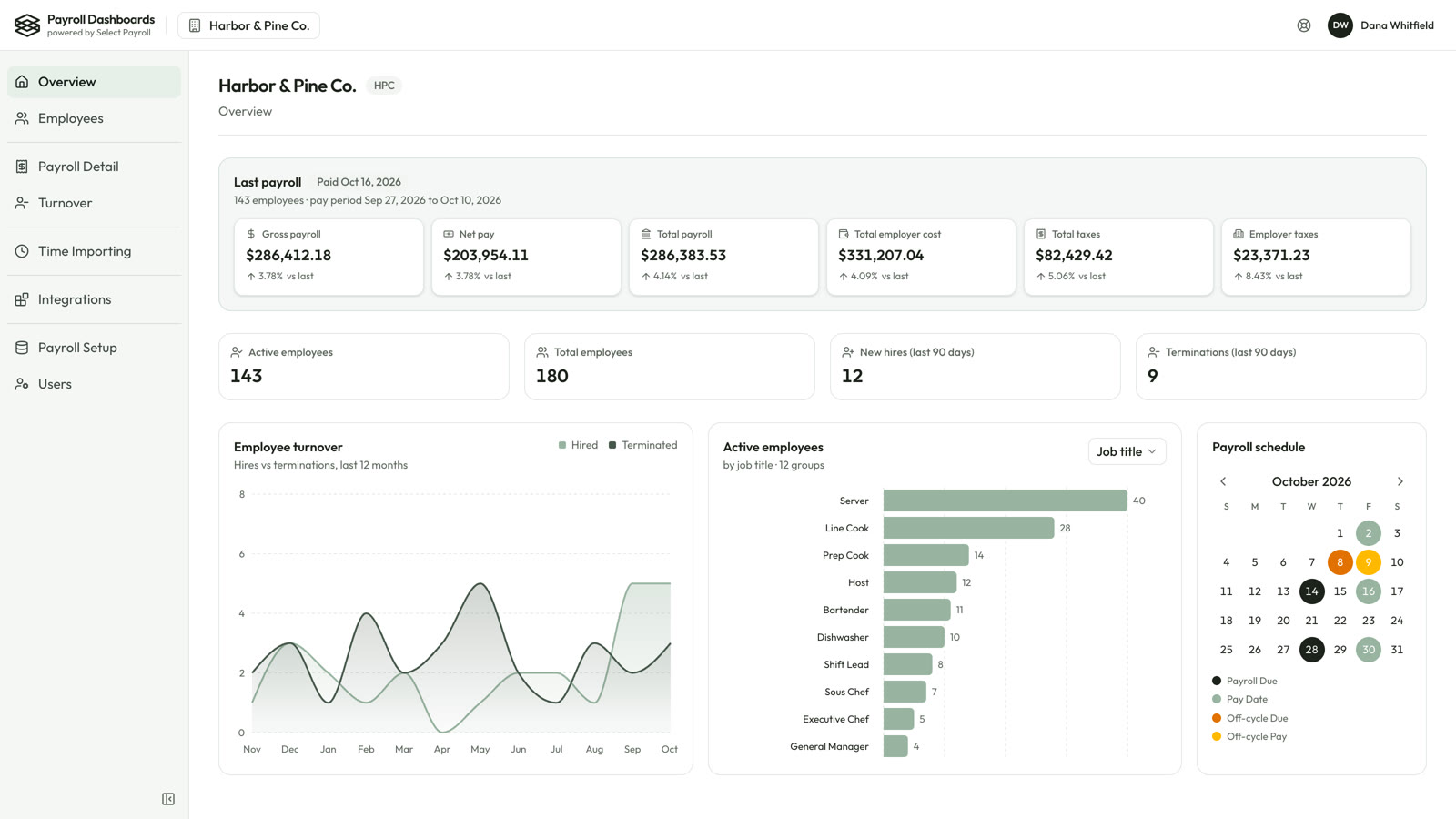
Your Overview shows the last payroll for each pay group: gross pay, net pay, total payroll, employer cost, taxes and employer taxes, each compared to the run before.

  • Active and total employees, new hires and terminations
  • Hires versus terminations over the last 12 months
  • Active employees by job title, location or pay type
  • Your payroll calendar, regular and off-cycle runs
Overview page showing the last payroll compared to the prior run
Workforce Analytics

The full picture behind each run

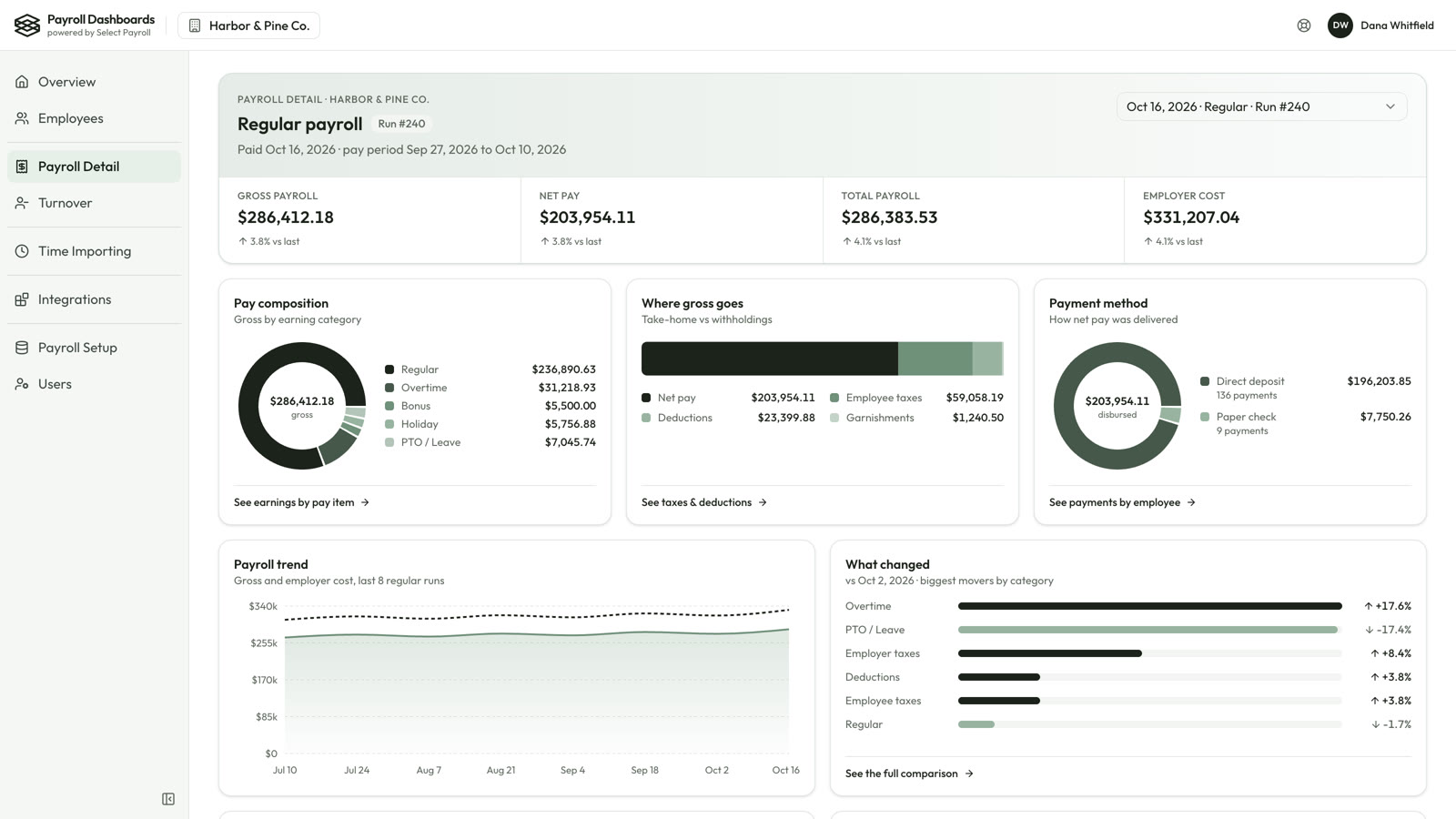
Open any payroll to see where the money went and how it was paid.

  • Pay composition and where gross pay goes
  • Direct deposit versus paper checks
  • The biggest movers since your last payroll
  • Payroll by job title, location or pay type
Payroll Detail page with pay composition, gross breakdown and payment method
Workforce Analytics

Turnover, priced in dollars

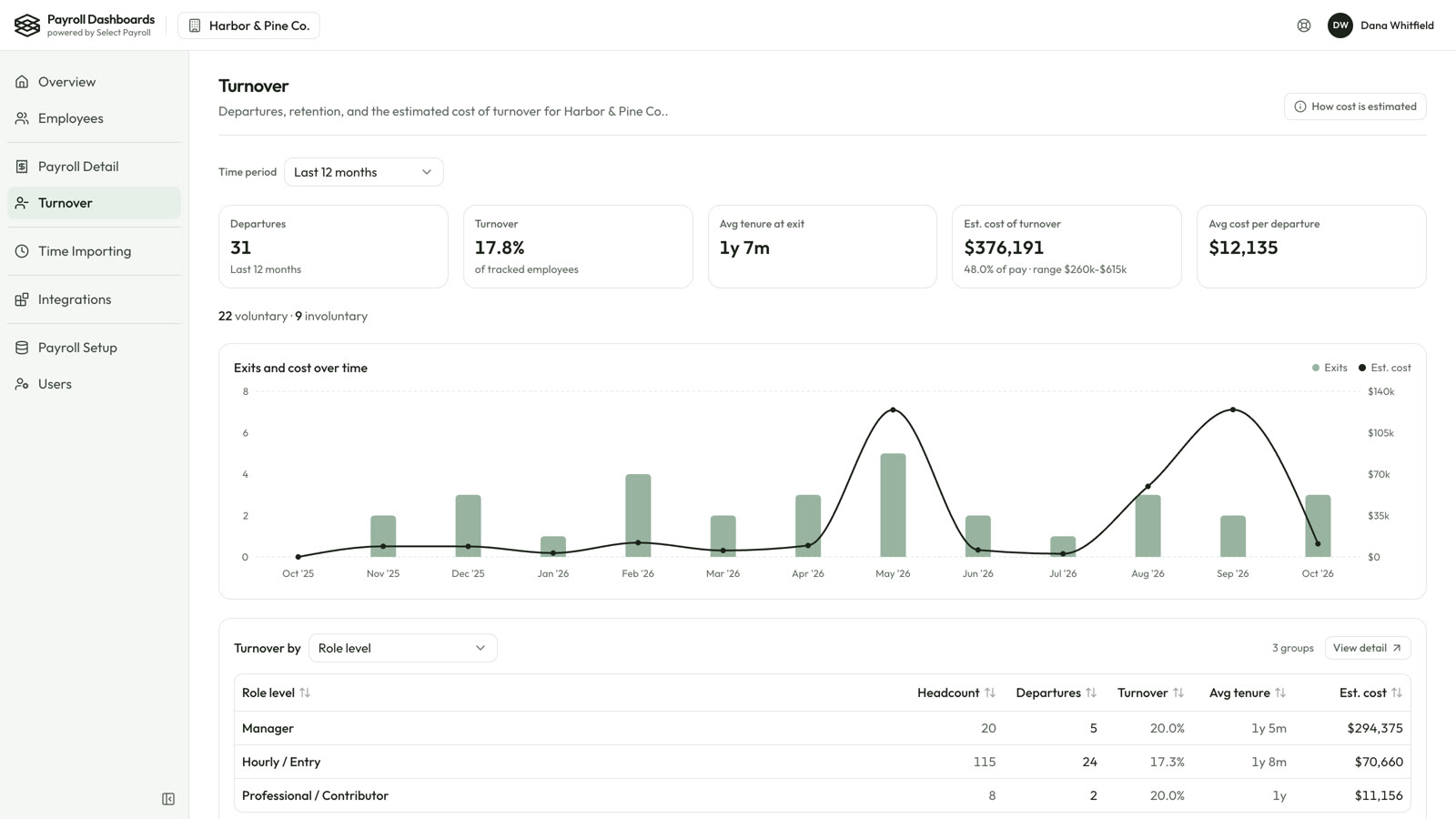
See who's leaving, from where, and an estimated cost of turnover based on published research.

  • Departures, turnover rate and tenure at exit
  • Exits and cost month by month
  • Broken down by job, location or reason
Turnover page showing estimated cost of turnover
Free

Know the moment payroll is ready

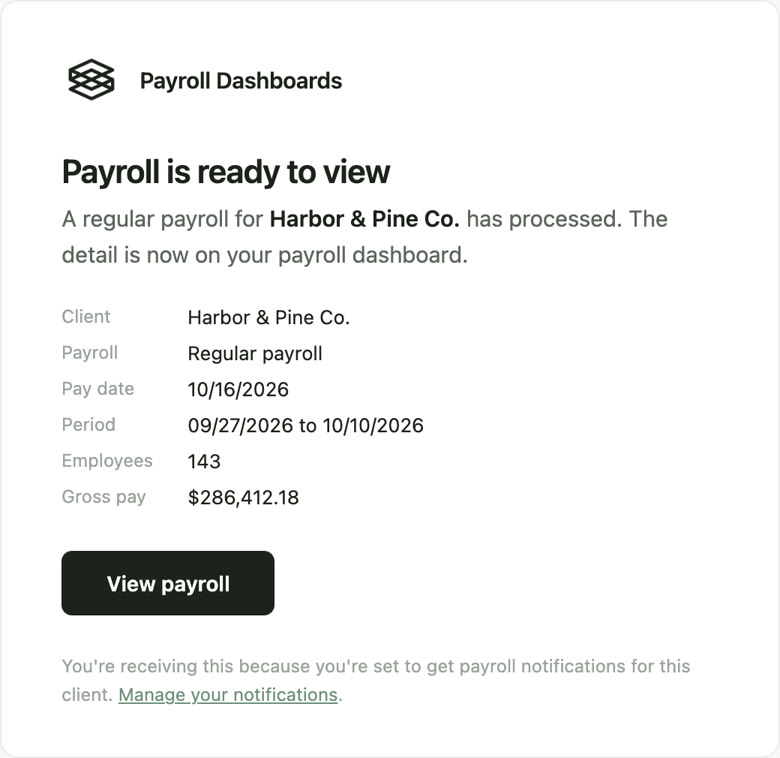
As soon as a payroll processes, its detail lands on your dashboard and you get an email with a link straight to that run.

  • Pay date, period, employee count and gross pay at a glance
  • Each person picks the emails they want
Catch it

Mistakes are cheaper to catch than to fix.

Time Importing

Nothing reaches payroll without a review

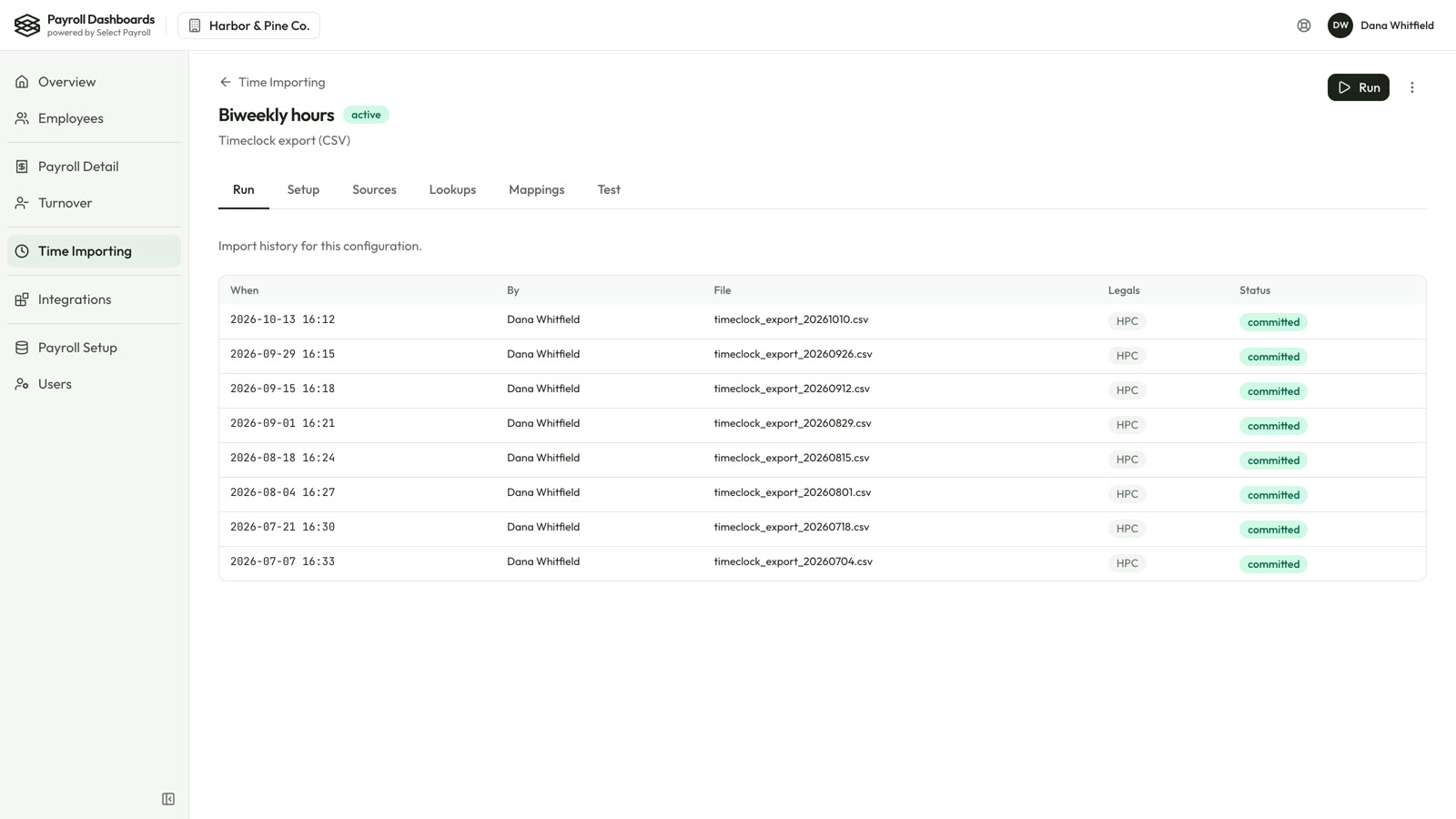
Every time import is validated and laid out for your team to check before it posts. That review step is how a $1,600 hourly rate got stopped before payroll ran.

  • Problems flagged before you confirm
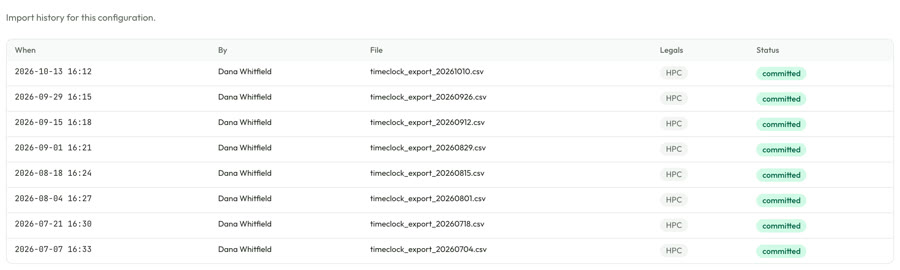
  • A clear record of every import and who ran it
Time Importing history of reviewed and committed imports
Workforce Analytics

Unusual payments, named after every run

Who was paid more than once, who was paid after leaving, and zero-net checks, checked against your roster every time a payroll processes.

  • Coverage: how many active employees were paid
  • New hires paid this run
Who was paid panel
Skip the busywork

The payroll chores that eat your week, handled.

Time Importing

Import hours from nearly any time system

Track time in a separate system? Keep it. Time Importing takes the hours exported from nearly any third-party time and attendance system and imports them straight into your payroll.

  • Works with a CSV or Excel export from your current system
  • We map your file once: employees, pay codes, jobs and locations
  • No retyping hours, no reformatting spreadsheets
Time Importing run history
Integrations

Your payroll, sent where it needs to go

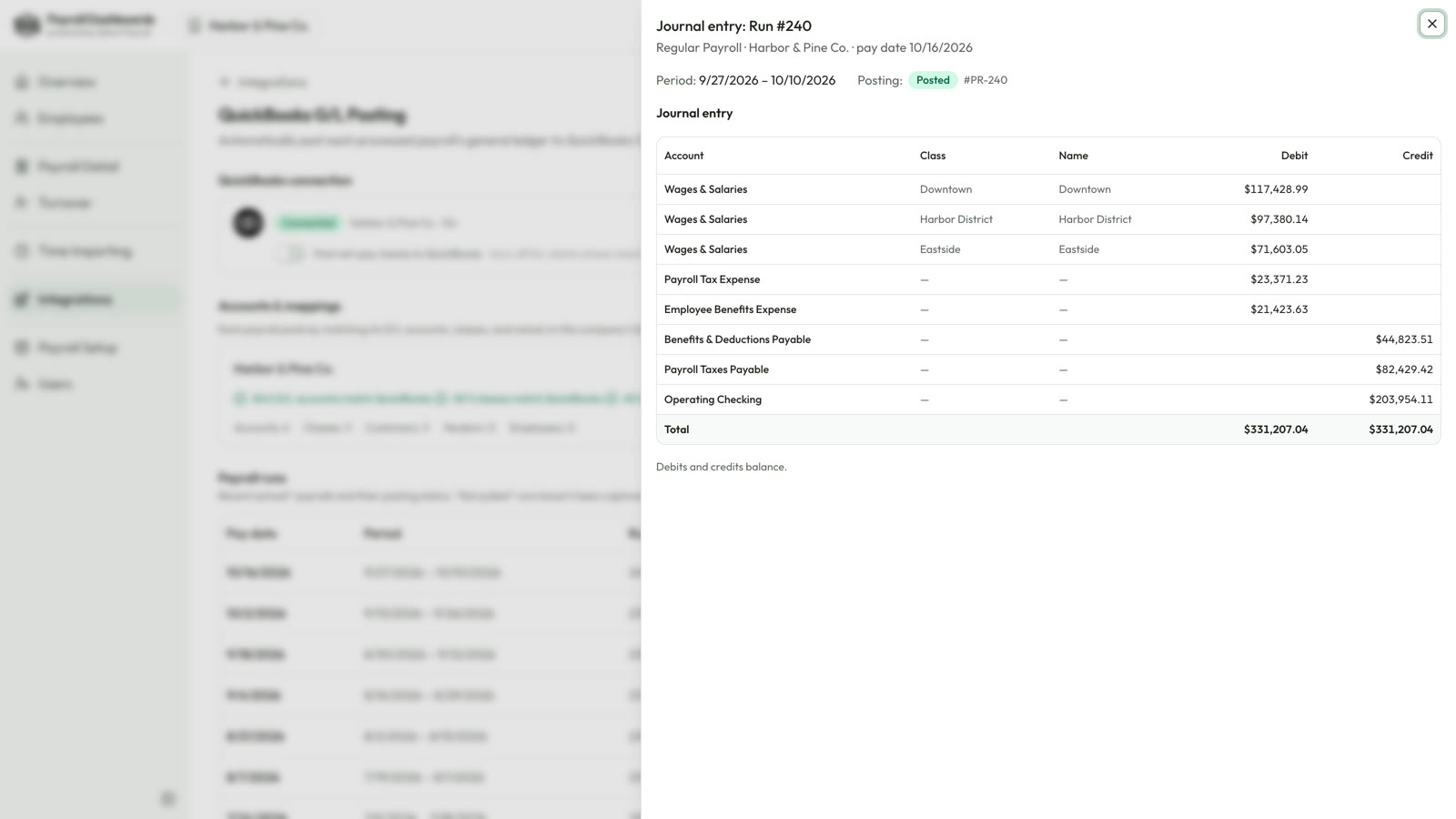
Integrations connect your payroll data to the tools you already use. For example, every processed payroll can post its G/L journal entry to QuickBooks® Online automatically, mapped to your accounts and classes.

  • Debits and credits balance, every run
  • Wages split by location or department
  • A history of every payroll and its posting status
QuickBooks journal entry for a payroll

Screens shown with sample data.

Plans

Start free. Add what you need.

Every SelectPayroll client gets the Overview at no cost. Choose the add-ons your business needs, when it needs them.

Free for SelectPayroll clients

Overview

Your payroll and workforce at a glance, after every run.

  • Your last payroll for each pay group: gross pay, net pay, total payroll, employer cost, taxes and employer taxes
  • Every total compared to the run before
  • Active and total employees, new hires and terminations in the last 90 days
  • Hires versus terminations over the last 12 months
  • Active employees by job title, location or pay type
  • Your payroll calendar: due dates and pay dates, regular and off-cycle
  • Your employee directory
  • An email the moment each payroll is ready
Add-on

Workforce Analytics

  • Payroll Detail for every run: pay composition, where gross pay goes, payment method, who was paid
  • Run-to-run comparisons and the biggest movers
  • Turnover analytics, with the estimated cost in dollars
Add-on

Time Importing

For businesses that track time outside of payroll.

  • Import hours from nearly any time system's CSV or Excel export
  • Every import reviewed before it posts to payroll
Add-on

Integrations

Send your payroll data to the tools you already use.

  • For example: post each payroll's G/L journal entry to QuickBooks® Online automatically
Built for your business

Need something that isn't on the list? We build it.

Every business runs a little differently. Our team builds custom tools and integrations around your payroll data and the way you work.

Custom integrations

Connect the systems you already use

Turn your scheduling or time system's export into a payroll import, post hours to QuickBooks by customer or job, or send payroll data where your accountant needs it.

Automated reports

The right report, to the right person

Reports built from your payroll and delivered on schedule to owners, managers or your accountant, without anyone running them.

Calculations

Pay rules that live outside payroll

Production bonuses, commissions, allocations and billing splits calculated from your data, then fed back into payroll or your books.

Operations dashboards

Payroll next to the rest of the business

Profit and loss, labor cost by client or location, cash flow needs and compliance deadlines, together in one place.

How it works

Nothing new to learn. Nothing to retype.

We connect it

Your SelectPayroll team links Payroll Dashboards to your isolved® payroll. There's no data entry and no new system to set up.

Payroll flows in

Each time a payroll processes, its details arrive on your dashboard and you get an email that it's ready.

You see the story

What you paid, what changed and what it costs, ready for you, your managers and your accountant.

You decide who sees what.

Pay stays privatePay rates and salaries show only to the people you allow. Others can see the employee directory without pay.
Access by roleGive each person the right level, from full access to view-only.
Invite your own teamAdd your managers or your accountant yourself, and switch someone off at any time.
Automatic sign-outIdle sessions sign out on their own, so an unattended screen doesn't stay open.
Questions

Common questions

Do I need to change how I run payroll?

No. Payroll Dashboards reads the payroll your SelectPayroll team already processes for you on isolved®. Nothing about how you run payroll changes.

What do I have to set up?

Very little. Your SelectPayroll team connects it and loads your history. You decide who on your team gets access.

Is there a free version?

Yes. Every SelectPayroll client gets the Overview free: your last payroll for each pay group compared to the run before, headcount, hires and terminations, your payroll calendar, the employee directory and an email when each payroll is ready. Add Workforce Analytics, Time Importing or Integrations whenever you need them.

Will Time Importing work with our time clock?

Most likely. Time Importing works with a CSV or Excel export from nearly any third-party time and attendance system. We map your file once, and each export after that imports the same way.

What can Integrations connect to?

Integrations send your payroll data to the tools you already use. QuickBooks Online is available today: each processed payroll's journal entry posts automatically, mapped to your chart of accounts and classes.

Can my accountant see it?

Yes. Invite them with the level of access you want, and remove them whenever you like.

Can you build something specific to our business?

Yes. We build custom tools and integrations around your payroll data, from connecting another system to automated reports and operations dashboards. Tell us what you need and we'll scope it with you.

How much do the add-ons cost?

It depends on the size of your company and which add-ons you choose. Talk to us and we'll put together a price for you.

See what your payroll has been telling you.

We'll walk you through Payroll Dashboards using your own payroll. Email hello@selecthcm.com or call 760-487-8064.

Payroll Dashboards comes from SelectPayroll, part of SelectHCM. Learn more about us at www.selecthcm.com.